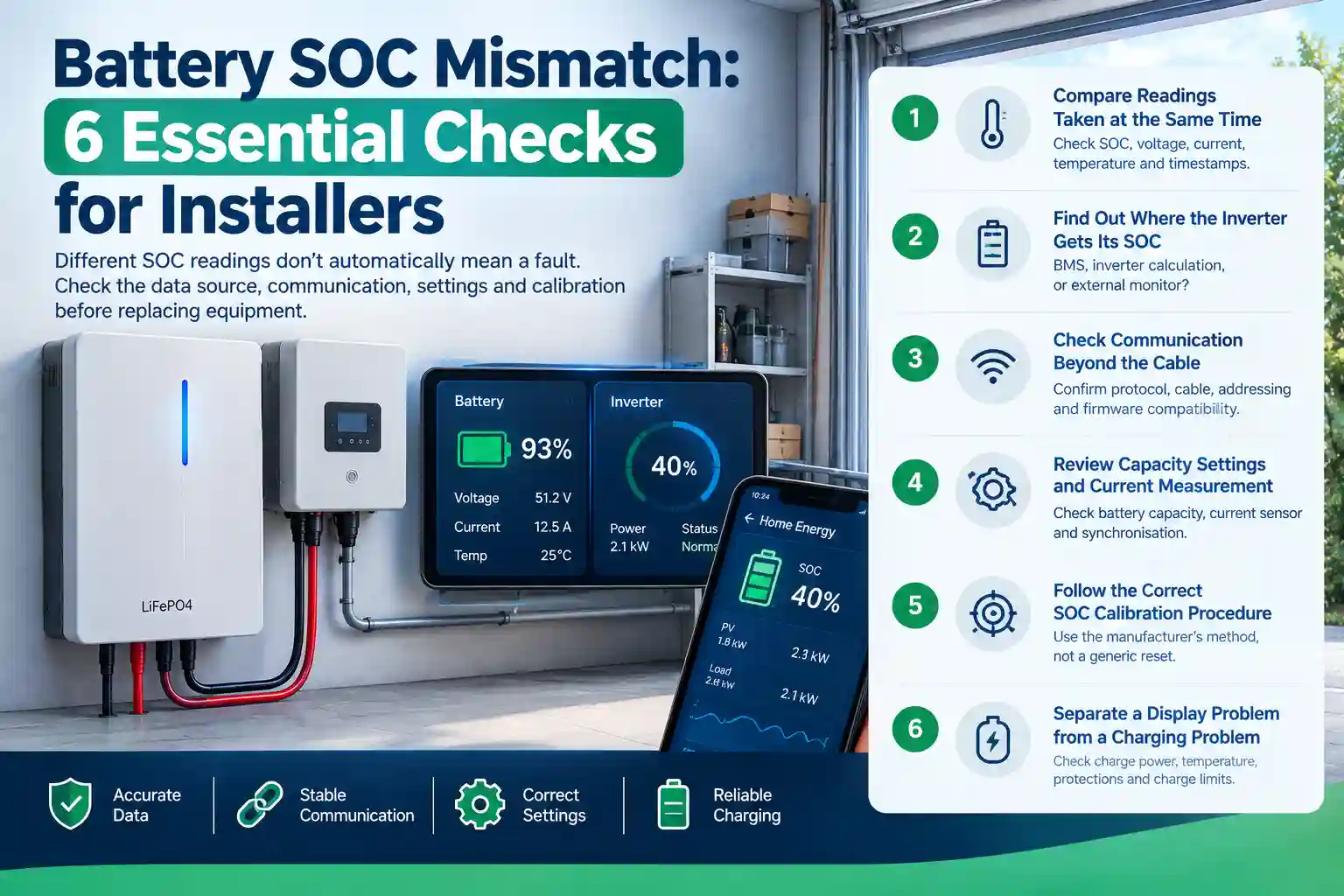
A battery SOC mismatch can turn a straightforward commissioning job into an awkward conversation. The battery says 93%. The inverter app says 40%. Your customer wants to know which number to trust.
Different readings do not automatically mean the battery is faulty. First check whether both displays use the same data source, whether their readings are current, and whether battery communication is working.
SOC means state of charge—the estimated percentage of charge remaining. It is a calculated value, so the source and settings matter.
One Reddit user reported this 93% versus 40% discrepancy. The report illustrates the problem; it does not establish the cause or prove either reading correct.
Here are six checks to work through before replacing equipment.
1. Compare Readings Taken at the Same Time
Take screenshots of the battery display, inverter screen and monitoring app as close together as possible.
Record SOC, voltage, current, temperature, alarms and the app’s last-update time. Confirm whether each percentage represents one battery module or the complete bank.
Measure the SOC gap in percentage points. A battery reading of 93% and an inverter reading of 40% differ by 53 percentage points, not simply “53%.”
For consistency, calculate battery SOC minus inverter SOC:
| Reading |
Example |
| Battery SOC |
93% |
| Inverter SOC |
40% |
| Difference |
+53 percentage points |
| Operating condition |
Record charging, discharging or idle |
Repeat the comparison under similar operating conditions. Note whether the gap stays steady, narrows or grows during charging and discharging. A persistent or growing difference is more useful diagnostically than one screenshot.
Check timestamps first, though. A delayed dashboard can make two devices appear to disagree.
2. Find Out Where the Inverter Gets Its SOC
Check the inverter’s battery mode and documentation.
Does it receive SOC from the battery management system, calculate its own estimate, or use an external battery monitor?
If the inverter estimates SOC from voltage while the battery uses another method, their readings may differ. LiFePO4 voltage alone is not a precise fuel gauge across its relatively flat operating range.
Our BMS communication protocol guide explains the information a compatible battery can share with an inverter.
Identify the source before deciding which number to investigate.
3. Check Communication Beyond the Cable
A plugged-in cable does not prove that valid battery data is being exchanged.
Confirm the exact battery and inverter models, supported protocol, cable pinout, addressing and firmware combination. Use the equipment manuals rather than copying DIP-switch positions from another installation.
Working communication confirms data exchange—not accurate SOC estimation. The reporting BMS or external monitor may still have incorrect settings, measurement errors or a synchronisation problem.
If both screens show the same number, they may simply be displaying the same estimate.
For interface basics, see our CAN vs RS485 battery communication guide.
Save the existing configuration before making changes. Change one documented setting at a time so you can identify what actually helped.
4. Review Capacity Settings and Current Measurement
Where a device calculates SOC from measured current, incorrect capacity settings or missed current can affect the result.
Pay particular attention after adding batteries, replacing a monitor or changing wiring.
Victron’s BMV-700 troubleshooting manual identifies incorrect settings, synchronisation problems and incomplete current measurement as possible causes of inaccurate SOC. Its shunt-wiring instructions apply to that monitoring arrangement, not automatically to every integrated BMS.
| What you observe |
What to check next |
| Local screens agree, cloud app differs |
Update time and monitoring connection |
| Voltage appears, but SOC is missing or frozen |
Data source, communication status and protocol |
| Difference grows over several cycles |
Capacity settings, current measurement and synchronisation |
| Charging stops unexpectedly |
Alarms, charge limits, temperature and inverter schedule |
These are starting points, not confirmed diagnoses.
5. Follow the Correct SOC Calibration Procedure
A battery SOC mismatch may involve calibration, but “drain it to zero and charge it again” is not a universal solution.
Request the procedure for the exact battery, BMS or external monitor. Some systems require specific charging conditions before recognising a full-charge reference.
Do not force a displayed 100% just to make the screens agree. Changing an estimate does not put energy into the battery.
Keep charging voltage, current and temperature within the manufacturer’s limits throughout any approved procedure.
6. Separate a Display Problem from a Charging Problem
If the battery is not charging, look beyond the percentage.
Check available charging power, time-of-use settings, battery temperature, active protections and any charge-current limit reported by the BMS.
For example, FenchPower’s 51.2V 5.12kWh wall-mounted battery lists CAN/RS485 communication and a charging temperature range of 0–45°C. These published specifications are useful checks, but do not establish compatibility with a particular inverter or identify a fault.
Request the applicable manual and supported configuration for the supplied unit.
Frequently Asked Questions
Which SOC reading should I trust?
Identify each reading’s source first. A correctly configured BMS or battery monitor may supply the intended control value, but either can require investigation. Do not choose whichever number looks more reassuring.
Does a battery SOC mismatch mean I need a replacement?
No. Check data timing, configuration, communication and calibration first. A replacement decision needs evidence of a battery or hardware fault.
What should I send to the supplier?
Send model numbers, firmware versions, simultaneous screenshots, the SOC difference in percentage points, alarm codes and any recent system changes.
Check Compatibility Before Your Next Order
For a new installation or distributor order, confirm the supported battery–inverter combination before shipment.
Contact FenchPower with your inverter model, required battery capacity and order quantity. Request the relevant specifications, communication instructions and compatibility confirmation.
For an existing issue, start with model numbers and screenshots. Clear records help the supplier recommend the next check without another round of guesswork.